옥션위니를 통해 더 쉽게 거래하세요!
경매 서비스 이용을 위해서는 출품사 인증절차가 필요합니다.
인증을 위해 지역별 영업담당자에게 연락해주세요.
(대표번호 : 02-576-5533)
Dear. Customers
From 184th auction, we no longer provide invoices via Whatsapp with our new features.
You can view, download and print the proforma invoice yourself in my order easily.
How to download your invoice 1) Click the 'Unpaid invoice' banner on top of the main. 2) On the My Order page, you can find the list of 'Step3. Check proforma invoice ' bookings. 3) Click these bookings and scroll down until you see the Proforma Invoice (P.I.) download button. 4) You can view your proforma invoice and also download it in PDF format.
My Auction > My Order > Details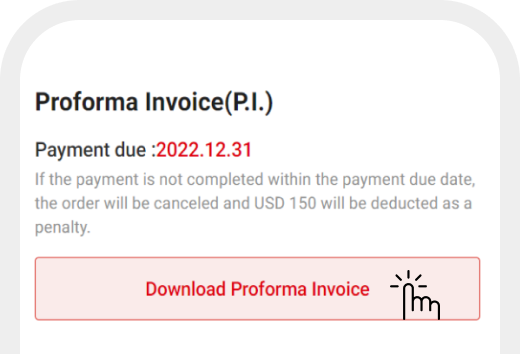
When can I download my invoice? After the auction is finished, let us know your delivery condition with bidding confirmation. We will issue the invoice as soon as possible at your request.
Can I edit my invoice details?
Editing the invoice feature is not supported.
If you want to amend details in the invoice, contact your cs staff in charge.
*Please remember that if the payment is not completed within the payment due date, USD 150 will be deducted as a penalty.
**Keep in mind the invoice will be issued 2 days after the auction is finished at the latest.
Have another question? Feel free to contact us.
Thank you.
경매 서비스 이용을 위해서는 출품사 인증절차가 필요합니다.
인증을 위해 지역별 영업담당자에게 연락해주세요.
(대표번호 : 02-576-5533)